Use your crypto for mobile internet on your next trip. With eSIM2Go, choose a data package, pay and install a digital SIM on a compatible, carrier-unlocked phone. There is no physical SIM to collect from a shop. Website purchases use NOWPayments; direct USDT TRC20 payments are available in the Telegram Mini App. Choose the route that suits how you want to pay and receive your eSIM.
Prefer direct USDT TRC20, GRAM or Stars? Open eSIM2Go in Telegram →
Start with your country and data allowance
These links open package comparisons on our country pages. Prices and availability are checked again when you choose a plan. A fixed 10 GB / 30-day package means 10 GB for the entire period, not every day.
| Destination | Light-use comparison | Larger package comparison |
|---|---|---|
| Thailand | 1 GB / 7 days | 10 GB / 30 days |
| Vietnam | 1 GB / 7 days | 10 GB / 30 days |
| Turkey | 1 GB / 7 days | 10 GB / 30 days |
| United States | 1 GB / 7 days | 10 GB / 30 days |
| United Arab Emirates | 1 GB / 7 days | 10 GB / 30 days |
| Spain | 1 GB / 7 days | 10 GB / 30 days |
| France | 1 GB / 7 days | 10 GB / 30 days |
| China | 1 GB / 7 days | 10 GB / 30 days |
Where to pay and where to receive your eSIM
| Purchase route | Payment | Installation details |
|---|---|---|
| Website | Cryptocurrency through NOWPayments; select an available currency and network at checkout | On the website order page after payment confirmation |
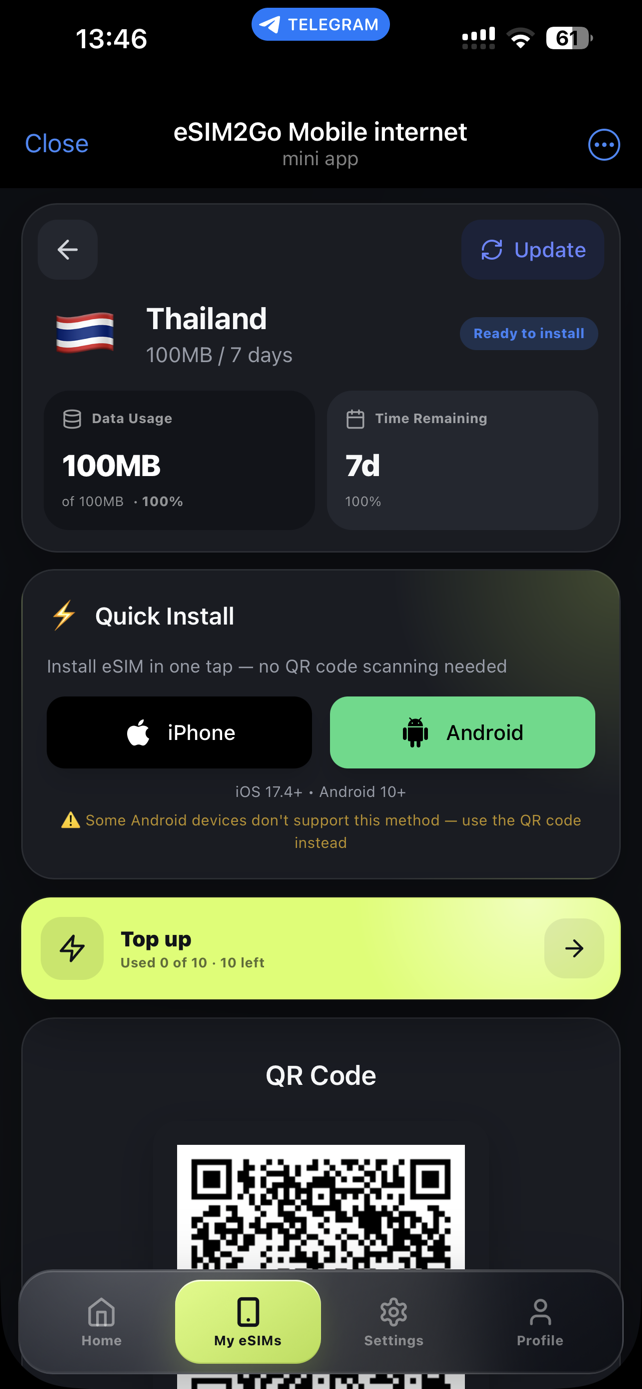
| Telegram Mini App | Direct USDT TRC20, GRAM, Telegram Stars, Crypto Bot or NOWPayments | In My eSIMs inside eSIM2Go after payment confirmation |
A USD price is the package price, not a promise of card checkout. The website flow described here is crypto checkout. In Telegram you can also choose Stars; official ways to buy Stars, including bank-card options, depend on your platform and region. Check the final total in the selected payment flow.
Buy on the website in four steps
- Choose your destination and check data, validity, networks, activation and phone compatibility. Click Buy on website.
- Review the selected package and enter an email for order recovery. This email helps support find the order; it is not the eSIM delivery channel.
- Continue to NOWPayments. Check the available currency, network, payable amount, any minimum and the invoice expiry. Check your wallet or exchange withdrawal fee separately before sending.
- After payment confirmation, return to your website order page. Save its private link and follow the QR or manual installation instructions. Do not share the private link publicly.
Pay directly with USDT TRC20 in Telegram
- Open the official @eSIM2GoBot, launch the Mini App and choose your country and package. Check the current total and available rewards before paying.
- Select the direct USDT TRC20 option and follow the payment instructions shown for that purchase. Use the displayed address, amount and network; do not reuse details from an old payment.
- USDT on another network is not interchangeable with TRC20 for this payment. Check the sending platform supports the requested network and whether its withdrawal fee reduces the amount received.
- Wait for the payment confirmation in the app, then open My eSIMs. Sending a transfer is not the same as a confirmed payment. If the status does not update, contact support with the payment reference; never share a seed phrase or private key.
Compare the total cost, not just the package price
The Mini App offers 20% off the first order and a bonus balance for future purchases. Check the applied offer and amount on your order screen: a bonus is not money returned to your bank or wallet. These Mini App benefits do not automatically apply to a website purchase. For a small data package, a wallet or exchange fee can materially change the total cost; compare the available payment options before sending.
Before paying, check four things
- Your exact phone variant supports eSIM and is carrier-unlocked.
- The package covers your destination and the whole trip. Check when validity starts; installation and activation are not always the same event.
- A data-only package does not include a local phone number, voice calls or ordinary SMS. Keep your normal line if you need its number and check its roaming charges separately.
- Check hotspot support, daily high-speed limits and top-up availability for the specific package. Do not assume every package can be topped up.
Unsure how much data to buy? Use our trip data guide. For setup and your home number, read the two-SIM travel checklist.
Questions before buying with crypto
Can I pay with USDT on the website?
The website uses NOWPayments. The currencies and networks offered for your invoice are shown there. For the direct USDT TRC20 route described in this guide, use the eSIM2Go Telegram Mini App.
Can I pay with Telegram Stars or Crypto Bot?
Both are payment options in the Telegram Mini App, alongside GRAM and direct USDT TRC20. Choose the option and review its final amount before confirming.
Will a website purchase appear in Telegram automatically?
Do not assume automatic synchronisation. A website purchase gives installation details on the website; a Telegram purchase is available in My eSIMs in the Mini App. Save access to the channel you used.
What if I sent a payment but have no eSIM?
Check the order status and payment confirmation. Contact support with the order or payment reference if it remains unresolved. Do not send a second payment merely because the page has not updated, and do not publish activation codes or private order links.
Choose a plan using current catalogue information. Payment currencies, network fees and promotions can change; the live order screen is the reference. Product information checked on 1 October 2026. For payment questions: support@esim2go.org.